-
Ai->Canvas Plug-In Source Code Released
As I mentioned almost exactly one year ago, Adobe approved a request to open source my Ai->Canvas Illustrator plug-in. Since the initial release of the plug-in in 2010, it has always been my intent to release the source code, but the Illustrator SDK EULA (and my time commitments at Juicy Bits) prevented me from doing so. I’d like to re-thank Tom Krcha, Anubhav Rohatgi, Rajesh Budhiraja, and Vincent Hardy (and everyone else behind-the-scenes at Adobe) for their help. You can find projects for both PC (Win32 and x64) and Mac at the Ai2Canvas repository on GitHub. While Ai->Canvas exports HTML5… read more
-
JBNSLayoutConstraint Helper Categories
Recently, I’ve spent a lot of time updating my apps for iOS 7, and along the way, I’ve added Auto Layout to my older apps. During this process, I found myself writing verbose Auto Layout code over and over. For example, to center a view both horizontally and vertically in its superview, you do something like this: [self.view addConstraint: [NSLayoutConstraint constraintWithItem:view1 attribute:NSLayoutAttributeCenterX relatedBy:NSLayoutRelationEqual toItem:view1.superview attribute:NSLayoutAttributeCenterX multiplier:1.0f constant:0.0f]] [self.view addConstraint [NSLayoutConstraint constraintWithItem:view1 attribute:NSLayoutAttributeCenterY relatedBy:NSLayoutRelationEqual toItem:view1.superview attribute:NSLayoutAttributeCenterY multiplier:1.0f constant:0.0f]]; This tells Auto Layout that you’d like the centerX and centerY attributes of view1 to visually match the same attributes of its superview… read more
-
Unleashing Genetic Algorithms on the iOS 7 Icon
Last week, I released a Photoshop script that I’ve been using to make icons and rounded rectangles for my iOS 7 app updates. The script generates shapes using values that I reverse-engineered from Apple’s UIBezierPath class. If you’re creating rounded rects for user interface elements, the shapes it produces are a near-exact match. If you’re creating icons, the match is really, really close. Then, a couple of days ago, I received this tweet from Nick Heer: An easy way to test two images to see how well they match is to stack them as layers in Photoshop and set the… read more
-
Photoshop Script for iOS 7 Rounded Rectangles
When Apple revealed iOS 7 at this year’s WWDC, it was obvious that the new app icons had a more rounded rectangular shape. I was happy to see the improvement, because the old shape had an awkward transition between the rounded corners and the straight edges. With this new shape, it’s almost as if someone at Apple decided to finish the job and polish the corners with some high grit sandpaper. So, I ran the output of the UIBezierPath method through the vector processing code in Halftone 2, and I ended up with an Adobe Illustrator diagram of its construction.… read more
-
Ai->Canvas 1.2 for Illustrator CC (and CS6)
I’ve ported my Adobe Illustrator to HTML5 canvas export plug-in to work with Illustrator CC, and while I was at it, I added support for gradient stop opacities and non-zero/even-odd fill rules. I know that many of you are still running CS6, so I’ve added these features to the CS6 version too. You can download version 1.2 of the plug-in on the new Ai->Canvas project page. The gradient stop feature was a very common request, and I hope it avoids the need to hand-edit all of those alpha values in the exported code. Here’s one of my test files that… read more
-
Halftone 2 Object Interaction
I attended Apple’s WWDC 2013 event in San Francisco last week, and I spent a lot of time talking to fellow developers and designers. As we shared tips and techniques, there were a few topics that repeatedly came up regarding my Halftone 2 app. This post covers the user interaction model for graphical elements like this BOOM stamp: Background Halftone 2 uses an enhanced version of the interaction model that was used in the original Halftone. That model was the result of reconsidering how to manipulate objects in a touch-first environment. From an earlier post, titled I Have No Idea:… read more
-
Freemium Distaste
Background The original version of Halftone (henceforth referred to as Halftone 1 to avoid ambiguity), has been available in the App Store since February, 2011 for $0.99 USD. While it has enjoyed a surprising level of success, I’ve always wished that more people could try it. You see, the word halftone is unfamiliar to most users, and the app’s comic bent isn’t reflected in its name. I decided early on in the development of Halftone 2 that I would follow Paper’s lead and release a free app so that more people could try it at no risk and only purchase… read more
-
How to Make Your Own App Promo Cards
As many of you know, my Halftone app was featured by Starbucks as its Pick of the Week this past August. I visit Starbucks daily for my morning caffeine fix, and over the course of a couple weeks, I managed to collect a small stack of the Halftone cards. They’ve proven to be a fantastic promotional tool and a very handy way to give someone a free copy of the app. They’re so useful that I decided to make my own app promo cards for an upcoming event (larger image). It took me a little time to simplify the workflow,… read more
-
Illustrator to HTML5 Canvas Plug-In Updated for CS6
Update on 7/18/2013: An updated version of the Ai->Canvas plug-in is now available for CS6 and CC. My Ai->Canvas Plug-In (Canvas Tutorial”>introductory tutorial and read more
-
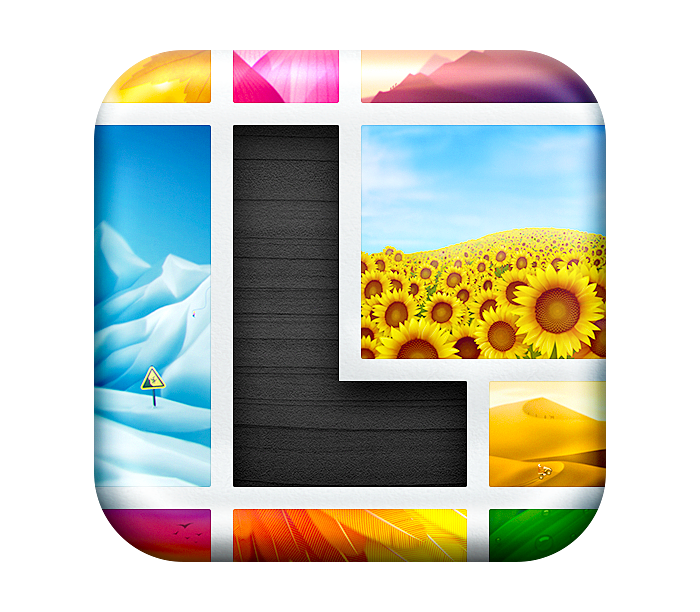
I’ve been heads-down working on my next Juicy Bits app, and it was just approved by Apple tonight. If all goes according to plan, it’ll be released in the next week or two. Watch for it. While I’m not ready to reveal the app name, I do want to share the icon. This beautiful icon was designed by Dmitry Tsozik and SoftFacade, the same folks who created my Halftone icon. We’ve collaborated over the past month or so to arrive at this final design, and I love it. Initial concepts were actual sketches, and as we iterated, the sketches became… read more